


Rear locker not disengaging


Thread Starter
JK Enthusiast
Joined: Jun 2008
Posts: 402
Likes: 0
From: Roxana, IL
 Rear locker not disengaging
Just got the rear axle back from the axle shop now the rear locker is staying locked. The light is not on and when you put the transfer case in 4lo and hit the rear switch the light just flashes until you hit the button to turn it off. Could this be a wiring problem or internal?
Chris
Chris

JK Jedi Master

Joined: Feb 2008
Posts: 12,907
Likes: 185
From: Maine
If, at the axle shop, they had the carrier out, they probably installed the lock sensor on the wrong side of the lock plate.
If this is the case:
Take it back and tell them the sensor is supposed to go in before the carrier.
With some luck, nothing is damaged.
This is what the sensor looks like when installed wrong:
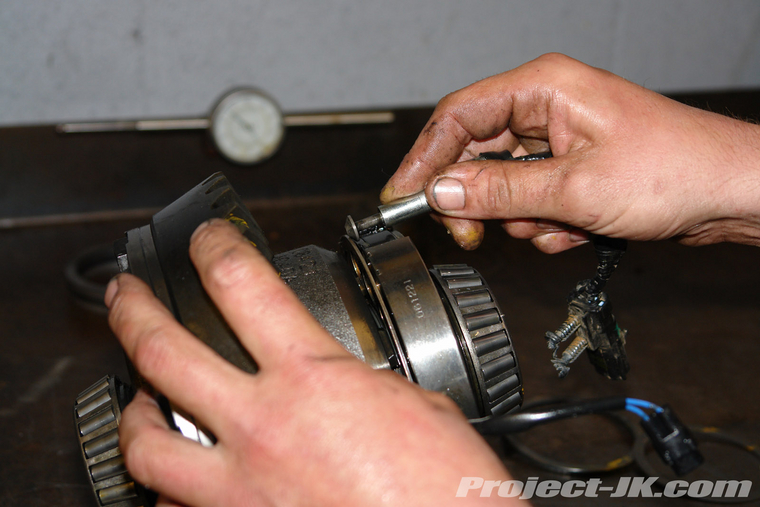
This is what the sensor looks like when installed correctly:
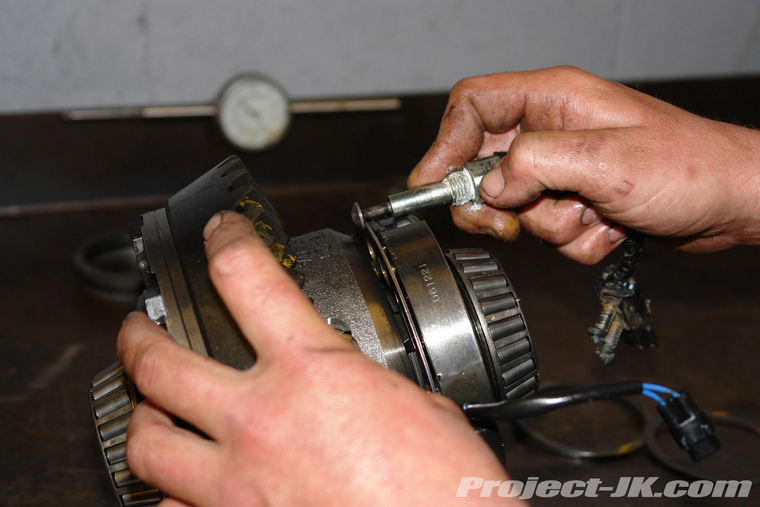
If this is the case:
Take it back and tell them the sensor is supposed to go in before the carrier.
With some luck, nothing is damaged.
This is what the sensor looks like when installed wrong:
This is what the sensor looks like when installed correctly:
Last edited by ronjenx; Mar 14, 2011 at 07:20 PM.
JK Jedi Master
Joined: Feb 2008
Posts: 12,907
Likes: 185
From: Maine
Try clicking on the links to them.
Showing wrong installation:
http://project-jk.com/gallery2/main....2_itemId=21654
Showing correct installation:
http://project-jk.com/gallery2/main....2_itemId=21658
Showing wrong installation:
http://project-jk.com/gallery2/main....2_itemId=21654
Showing correct installation:
http://project-jk.com/gallery2/main....2_itemId=21658
JK Jedi Master
Joined: Feb 2008
Posts: 12,907
Likes: 185
From: Maine
The mechanic probably installed the sensor after the differential.
The proper sequence is:
Remove diff
Remove sensor
Install sensor
Install diff
In your situation, you may now have to remove the sensor first.
Can you take a better pic that will clearly show the sensor on the wrong side of the lock plate? It would be good to have the pic for future reference.
Trending Topics
Thread Starter
JK Enthusiast
Joined: Jun 2008
Posts: 402
Likes: 0
From: Roxana, IL
Could not get any better pics. I read that it cannot be done but I somehow got the plunger on the correct side of the lock ring with the carrier in place. I remove the plunger and checked to make sure it was not bent and operated freely, then I tapped a wedge in to hold the lock ring tight to the magnet, the plunger is not long enough to get on the correct side of ring without threads being started. I bent a straight screwdriver so I could hold the plunger out. I held the plunger out and started to thread the sensor into the housing. The threads were a little hard to start because the plunger was on top of the ring instead of behind the ring where it goes. I then turned the sensor in a few turns and used the screwdriver to pop the plunger into the correct position. I checked and luckily did not bend the plunger as it still moves in and out freely. I also think there was quite a bit of luck involved!!!
Chris
Chris
JK Jedi Master
Joined: Feb 2008
Posts: 12,907
Likes: 185
From: Maine
Could not get any better pics. I read that it cannot be done but I somehow got the plunger on the correct side of the lock ring with the carrier in place. I remove the plunger and checked to make sure it was not bent and operated freely, then I tapped a wedge in to hold the lock ring tight to the magnet, the plunger is not long enough to get on the correct side of ring without threads being started. I bent a straight screwdriver so I could hold the plunger out. I held the plunger out and started to thread the sensor into the housing. The threads were a little hard to start because the plunger was on top of the ring instead of behind the ring where it goes. I then turned the sensor in a few turns and used the screwdriver to pop the plunger into the correct position. I checked and luckily did not bend the plunger as it still moves in and out freely. I also think there was quite a bit of luck involved!!!
Chris
Chris

I'm sure it will be helpful to people in the future.