GPS trail app



JK Freak
Joined: Sep 2011
Posts: 914
Likes: 6
From: Las Vegas, NV

I use Gaia GPS on my tablet. I go out and map the trail, then come home and download the map with wifi. You can also select an area on the screen and download the map for that area before you head out. I don't know if theres a way to download a specific trail before you head out. I might just not know how. I heard backcountry pro is another good one.
JK Freak
Joined: Sep 2011
Posts: 914
Likes: 6
From: Las Vegas, NV
It's not about the app working, it's whether you have a gps antenna built in to your device. My tablet is wifi only, but will track my location off roading with the gps antenna. For instance, while using google maps in town on your phone you can see your location ( because of the gps antenna ) and look up the nearest starbucks. ( because you have cell reception ) Say you take a road trip out of cell range, you can still see your location but can't look up anything because your phone can't access data. So downloading any maps can only happen when you have a data connection, but you can track yourself without it. Also if your device does not have a gps antenna you can buy an external one. If your not sure if you have one built in, turn on google maps and go for a drive beyond reception range and see if google can find you.
JK Jedi Master


Joined: Mar 2007
Posts: 14,800
Likes: 374
From: Midwest City, OK
You didn't specify what device you're running, so I'll pipe in about Android: Backcountry Navigator is a great tool. I use the paid version, which I think was $10. The maps I use are free (CalTopo database).
It is necessary to download the maps in advance. Once on the device, you no longer need an Internet connection (but you do have to tell BCN to work off a map that you have stored rather than off the Internet). I create map packages that I copy over to my PC (If you've never used Android, this is a very easy thing to do--when you connect the device, it's just another hard drive on your system). When I'm headed to an area, I just ensure that the map package(s) I need are copied back to the tablet. Bear in mind that maps are big and downloading takes time and they take up space on your device (which is why I save them on my PC): I have a 200 MPS Internet connection and downloading maps for a trip last year covering several hundred miles in Utah took a good day of marking areas to download, then waiting while it did. I think that may partially be due to the nature of "free" for the maps--they do ask for donations at the site.
Speaking of those maps, they are outstanding. They scale all the way down to a few hundred yards providing plenty of topographic map detail. You can add waypoints, which I use to mark notable features (waterfalls, etc), turns ("Turn left"), campsites, etc.
The device can import GPS routes that someone sent you easily (unlike my Garmin Nuvi 550 GPS). It can also export GPS routes if you enabled recording which can then be easily shared, or opened and reviewed in Google Earth--relive your trip from an eye in the sky!
What this app is not: It isn't not a navigation app. Yes, you can have a line plotted on the route and you can follow that line. But, it will not tell you when to turn (which is why I mark waypoints). You have to pay attention to the map, your intended route, and your actual route. However, if you make a wrong turn, you'll see yourself drift from the line and can (hopefully) retrace your route (assuming you didn't just inadvertently turn down the one-way part of Black Bear, LOL).
I can't say enough good things about Backcountry Navigator. Response to commands on my Nexus 7 (2012) tablet is fantastic (again, unlike that Garmin 550 which was slow, awkward and frustrating to pan and scale). The price is very modest. The maps are quite excellent, though for anyone who'd rather pay for maps/imagery, BCN does support other databases. Honestly, I travel all over the country into some pretty wild and remote areas and have never felt I needed any other maps than the free CalTopos. If you have an Android device, give the free trial version a run. If you have an Apple device, the only thing I can say is I have friends who use Gaia and like it. But they do seem to envy my BCN on occasion, LOL. ;-)
Some screenshots ...
Recording of our route up Carrizo Mtn near Ocotillo, CA ...
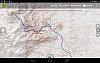
No existing route we could find, so a plot of our expected route using the dirt roads marked on CalTopo map to Tres Papalotes in Big Bend Ranch State Park (BBRSP), TX ...
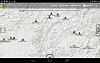
Recording of our route to Guale 2 at BBRSP, TX ...
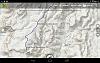
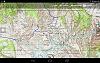
Recording of our route during a trip through the Gila National Forest, NM ...
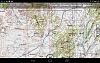
Recording of our route during a ten day, 463 mile off-road trip from Gateway, CO to BLM land on the north rim of Grand Canyon National Park, AZ. This is where we spent a couple days exploring around Lake Powell ...
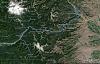
This is what an exported route from BCN looks like when imported to Google Earth. The symbology changes, but otherwise the data is all there. This was day two of a six day, 612 mile mostly off-road trip from Hood River, OR to Nighthawk Crossing on the Canadian Border.
It is necessary to download the maps in advance. Once on the device, you no longer need an Internet connection (but you do have to tell BCN to work off a map that you have stored rather than off the Internet). I create map packages that I copy over to my PC (If you've never used Android, this is a very easy thing to do--when you connect the device, it's just another hard drive on your system). When I'm headed to an area, I just ensure that the map package(s) I need are copied back to the tablet. Bear in mind that maps are big and downloading takes time and they take up space on your device (which is why I save them on my PC): I have a 200 MPS Internet connection and downloading maps for a trip last year covering several hundred miles in Utah took a good day of marking areas to download, then waiting while it did. I think that may partially be due to the nature of "free" for the maps--they do ask for donations at the site.
Speaking of those maps, they are outstanding. They scale all the way down to a few hundred yards providing plenty of topographic map detail. You can add waypoints, which I use to mark notable features (waterfalls, etc), turns ("Turn left"), campsites, etc.
The device can import GPS routes that someone sent you easily (unlike my Garmin Nuvi 550 GPS). It can also export GPS routes if you enabled recording which can then be easily shared, or opened and reviewed in Google Earth--relive your trip from an eye in the sky!
What this app is not: It isn't not a navigation app. Yes, you can have a line plotted on the route and you can follow that line. But, it will not tell you when to turn (which is why I mark waypoints). You have to pay attention to the map, your intended route, and your actual route. However, if you make a wrong turn, you'll see yourself drift from the line and can (hopefully) retrace your route (assuming you didn't just inadvertently turn down the one-way part of Black Bear, LOL).
I can't say enough good things about Backcountry Navigator. Response to commands on my Nexus 7 (2012) tablet is fantastic (again, unlike that Garmin 550 which was slow, awkward and frustrating to pan and scale). The price is very modest. The maps are quite excellent, though for anyone who'd rather pay for maps/imagery, BCN does support other databases. Honestly, I travel all over the country into some pretty wild and remote areas and have never felt I needed any other maps than the free CalTopos. If you have an Android device, give the free trial version a run. If you have an Apple device, the only thing I can say is I have friends who use Gaia and like it. But they do seem to envy my BCN on occasion, LOL. ;-)
Some screenshots ...
Recording of our route up Carrizo Mtn near Ocotillo, CA ...
No existing route we could find, so a plot of our expected route using the dirt roads marked on CalTopo map to Tres Papalotes in Big Bend Ranch State Park (BBRSP), TX ...
Recording of our route to Guale 2 at BBRSP, TX ...
Recording of our route during a trip through the Gila National Forest, NM ...
Recording of our route during a ten day, 463 mile off-road trip from Gateway, CO to BLM land on the north rim of Grand Canyon National Park, AZ. This is where we spent a couple days exploring around Lake Powell ...
This is what an exported route from BCN looks like when imported to Google Earth. The symbology changes, but otherwise the data is all there. This was day two of a six day, 612 mile mostly off-road trip from Hood River, OR to Nighthawk Crossing on the Canadian Border.
Last edited by Mark Doiron; Jan 31, 2016 at 12:42 PM.