


MAP sensor connector replacement


Thread Starter
JK Junkie


Joined: Nov 2011
Posts: 2,199
Likes: 218
From: Over the hill
 MAP sensor connector replacement
The replacement connector is part #5161924AA. It comes with wires meant to splice in after cutting the original wires. However, the best way is to remove the female pins from the original connector and insert them into the new connector.
The trick is removing the pins, and that's what this pic is showing.
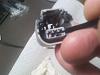
A sharp-end jewelers screwdriver, or one of the tools in the Mopar 6680A kit is angled under the tab beneath the female connector -- as shown in the blurry pic above. Press down to release, and pull the wire out the back. It's a lot easier here on the bench, so I'd suggest practicing with the new connector before getting under the hood and doing it.
Here's the connector disassembled. Before removing the pins (above) remove the blue snap-on cover at the front, and the black snap-on cover at the rear. The rear has some detents that are obvious. The blue front cover isn't as obvious, but it just pulls off.
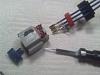
Assembly is simply snapping the parts in place.
While waiting for the connector, a temporary fix is to add a dap of silicone gasket sealer to the connector and MAP sensor to hold them together.

The trick is removing the pins, and that's what this pic is showing.
A sharp-end jewelers screwdriver, or one of the tools in the Mopar 6680A kit is angled under the tab beneath the female connector -- as shown in the blurry pic above. Press down to release, and pull the wire out the back. It's a lot easier here on the bench, so I'd suggest practicing with the new connector before getting under the hood and doing it.
Here's the connector disassembled. Before removing the pins (above) remove the blue snap-on cover at the front, and the black snap-on cover at the rear. The rear has some detents that are obvious. The blue front cover isn't as obvious, but it just pulls off.
Assembly is simply snapping the parts in place.
While waiting for the connector, a temporary fix is to add a dap of silicone gasket sealer to the connector and MAP sensor to hold them together.
Last edited by Mr.T; Apr 12, 2017 at 02:11 PM. Reason: Spelling...