


Pictures Too Large


Thread Starter
JK Jedi Master


Joined: Mar 2007
Posts: 14,800
Likes: 374
From: Midwest City, OK
 Pictures Too Large
I'm being told that images I share on the forum have started appearing too large, necessitating sideways scrolling. Often the images are too large to be seen in whole on rather large displays. I did not see this problem in Google Chrome. The images resize nicely as I widen the browser. But I can see it in Internet Explorer.
I'm told it is only my images, but if I link another forum member's image (in a quote for example), then that image will be oversized. I usually share images by URL, not by attachment. You may see a slew of my posts in the Expedition Modded JKs thread--look at recent posts. Would appreciate your thoughts and ideas.
Thanks!
I'm told it is only my images, but if I link another forum member's image (in a quote for example), then that image will be oversized. I usually share images by URL, not by attachment. You may see a slew of my posts in the Expedition Modded JKs thread--look at recent posts. Would appreciate your thoughts and ideas.
Thanks!

JK Junkie
Joined: Nov 2013
Posts: 3,703
Likes: 8
From: The Dirty South
I use the MS free image resizer before I post to reduce them down in size. Once installed, you can resize pictures in bulk using the same method you use to copy images, namely highlighting the file names and then right clicking and select the new option resize. It came out for win xp and I have carried it through all my windows iterations, including my current release win 10 even though it is not advertised as working in any other releases but XP.
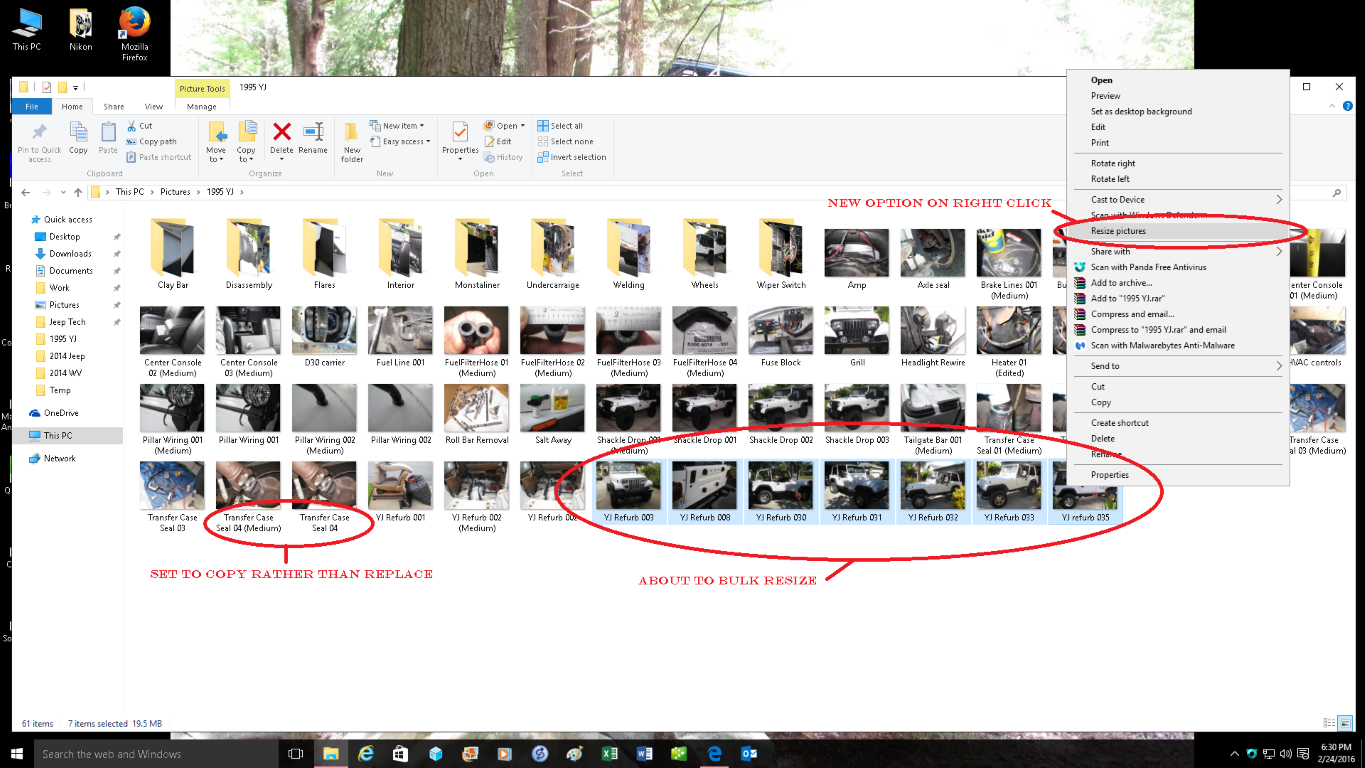
(I resized this screen print)
https://blogs.technet.microsoft.com/...-32-bit64-bit/
MS stopped releasing it but you can still get it at cnet I believe.
Image Resizer Powertoy for Windows XP - Free download and software reviews - CNET Download.com
I still have the download file if it comes to that.
(I resized this screen print)
https://blogs.technet.microsoft.com/...-32-bit64-bit/
MS stopped releasing it but you can still get it at cnet I believe.
Image Resizer Powertoy for Windows XP - Free download and software reviews - CNET Download.com
I still have the download file if it comes to that.
Last edited by 14Sport; Feb 24, 2016 at 02:45 PM.

Thread Starter
JK Jedi Master
Joined: Mar 2007
Posts: 14,800
Likes: 374
From: Midwest City, OK
Thread Starter
JK Jedi Master
Joined: Mar 2007
Posts: 14,800
Likes: 374
From: Midwest City, OK
I use the MS free image resizer before I post to reduce them down in size. Once installed, you can resize pictures in bulk using the same method you use to copy images, namely highlighting the file names and then right clicking and select the new option resize. It came out for win xp and I have carried it through all my windows iterations, including my current release win 10 even though it is not advertised as working in any other releases but XP.
(I resized this screen print)
https://blogs.technet.microsoft.com/...-32-bit64-bit/
MS stopped releasing it but you can still get it at cnet I believe.
Image Resizer Powertoy for Windows XP - Free download and software reviews - CNET Download.com
I still have the download file if it comes to that.
(I resized this screen print)
https://blogs.technet.microsoft.com/...-32-bit64-bit/
MS stopped releasing it but you can still get it at cnet I believe.
Image Resizer Powertoy for Windows XP - Free download and software reviews - CNET Download.com
I still have the download file if it comes to that.
JK Junkie
Joined: Nov 2013
Posts: 3,703
Likes: 8
From: The Dirty South