


2013 430N Garmin NAV system is CHEAP vs old 2012 430N


Thread Starter
JK Enthusiast
Joined: Mar 2009
Posts: 126
Likes: 1
From: The Free State
 ***NOW W/ PICS** 2013 430N Garmin NAV system is CHEAP vs old 2012 430N
I was sampling the new 430N NAV system on a 2013 Wrangler and I was shocked at the reduction in quality.
I currently have a 430N on a early 12 now, and there is a huge difference between the two. If anything, I would expect the newer system to be better. However, looks like Chrysler was cutting costs. Compared to the old 430N system, the new graphics are much lower quality, not nearly as bright or crisp. The roads, and highways that appear on the map are smaller and grainier. The color scheme is terrible and muddied looking.
To top it all off, there was some "static" in the background of the whole screen, like if your old TV antenna wasn't adjusted just right. It is very obvious on certain images / colors and is very glaring and disappointing to say the least. You can't even get a clear clean screen reception, never mind image? I thought maybe the one I looked at was a bad one, however, I looked at another vehicle, and while the static / reception wasn't quite as apparent, it still had some too.
My "old" 430N system is bright and crisp and has none of that! What happened? Did anyone else notice this?
What could one do if they bought a vehicle with one of the worse screen reception issues (the one I was looking at was my pre order, but I don't know now)?
Is that something that can / would even be fixed? It's disgusting that you could pay all of that money for a new vehicle and have such a glaring cursory quality flaw like that.
UPDATED WITH PICS!!!!
Old 430
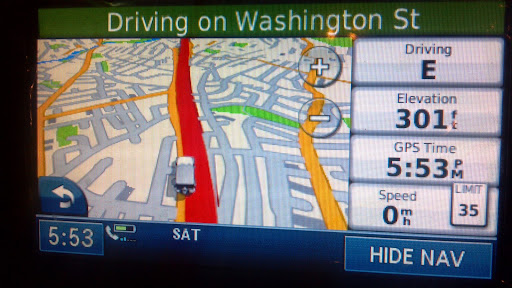
Vs. "New" 430

Old 430

Vs. "New" 430
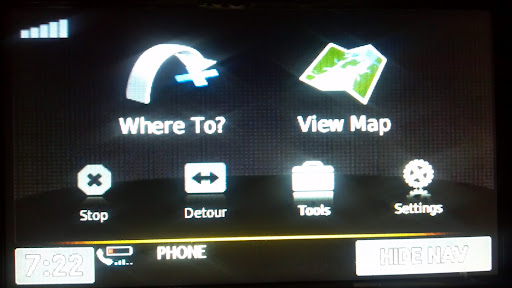
Also, the new 430 nav doesn't tell you what the next upcoming exit is on the highway. It just keeps the name of the route you're on at the top. The old 430 would keep you abreast of upcoming exit numbers.
I currently have a 430N on a early 12 now, and there is a huge difference between the two. If anything, I would expect the newer system to be better. However, looks like Chrysler was cutting costs. Compared to the old 430N system, the new graphics are much lower quality, not nearly as bright or crisp. The roads, and highways that appear on the map are smaller and grainier. The color scheme is terrible and muddied looking.
To top it all off, there was some "static" in the background of the whole screen, like if your old TV antenna wasn't adjusted just right. It is very obvious on certain images / colors and is very glaring and disappointing to say the least. You can't even get a clear clean screen reception, never mind image? I thought maybe the one I looked at was a bad one, however, I looked at another vehicle, and while the static / reception wasn't quite as apparent, it still had some too.
My "old" 430N system is bright and crisp and has none of that! What happened? Did anyone else notice this?
What could one do if they bought a vehicle with one of the worse screen reception issues (the one I was looking at was my pre order, but I don't know now)?
Is that something that can / would even be fixed? It's disgusting that you could pay all of that money for a new vehicle and have such a glaring cursory quality flaw like that.
UPDATED WITH PICS!!!!
Old 430
Vs. "New" 430
Old 430
Vs. "New" 430
Also, the new 430 nav doesn't tell you what the next upcoming exit is on the highway. It just keeps the name of the route you're on at the top. The old 430 would keep you abreast of upcoming exit numbers.
Last edited by Mlupacchino; Dec 29, 2012 at 12:13 PM.

Thread Starter
JK Enthusiast
Joined: Mar 2009
Posts: 126
Likes: 1
From: The Free State

Only setting I saw was "brightness". A quality setting doesn't even make sense. What would be the point of being able to reduce the image quality on any monitor? Monitors don't have settings like that. And that wouldn't explain the static. The other unit I saw had the same image obfuscation, though to a lesser degree.

Thread Starter
JK Enthusiast
Joined: Mar 2009
Posts: 126
Likes: 1
From: The Free State

UPDATED WITH PICS!!!!
Old 430
Vs. "New" 430
Old 430
Vs. "New" 430
Also, the new 430 nav doesn't tell you what the next upcoming exit is on the highway. It just keeps the name of the route you're on at the top. The old 430 would keep you abreast of upcoming exit numbers.

JK Super Freak
Joined: Apr 2008
Posts: 1,591
Likes: 1
From: East Coast
I have the new 430 in 2012 and have none of the problems you are talking about, tells me next exits, automatically enlarges the next exit for a few seconds and in some areas even shows a photo overlay of the junctions. quite happy with the system except I am still trying to figure out how to hook up cameras.
Trending Topics
Thread Starter
JK Enthusiast
Joined: Mar 2009
Posts: 126
Likes: 1
From: The Free State
The "old 430N" pictures are from my old 2012. That system was great. You likely have the old system too. I am complaining about the "new" 430N on my 2013 that I also posted comparison pictures of.
It does not show the next exit on the highway.
It does not show the next exit on the highway.

JK Enthusiast
Joined: Feb 2010
Posts: 214
Likes: 0
From: Arkansas
I have a late model 2012 (built June 2012). I have the new version 430N too and notice that during the night mode (night colors), the screen does appear to have white dots (static) that show up on the map as it scrolls.
I have no idea why Garmin has so great quality picture in their nuvi units and this looks like the first generation garmins from long ago.
I have no idea why Garmin has so great quality picture in their nuvi units and this looks like the first generation garmins from long ago.

JK Freak

Joined: Mar 2012
Posts: 571
Likes: 28
From: Moss Beach, CA
I had a firmware update to my '12 430n unit and it looks similar to your pictures for the '13; so I'm not so sure it has to do with the new model year.
Mine seems to be working properly for denoting exits, etc.
You can alter the degree of magnification as well as the degree of detail if you go into the settings controls.
But I would agree; I liked the old format better, but I don't think it is an issue of a "cheaper unit"; just different programming.
Mine seems to be working properly for denoting exits, etc.
You can alter the degree of magnification as well as the degree of detail if you go into the settings controls.
But I would agree; I liked the old format better, but I don't think it is an issue of a "cheaper unit"; just different programming.

