


Superchips Flashpaq for JK, Initial Impressions


JK Enthusiast
Joined: Mar 2007
Posts: 281
Likes: 0
From: Atlanta, GA

I've been skimming through this thread for info that might be useful and found this one. My Sahara came with the tow pack and 4.10 gears. Is the Flashpaq able to detect this, or do I need to select the gearing in addition to choosing a standard tune? Other than tire size, is there anything else that should be manually selected?

Thread Starter
JK Junkie
Joined: Jul 2008
Posts: 3,017
Likes: 0
From: Lakewood, OH
It should be able to check the settings that are currently installed in the PCM. This will set your current gear set and you can always view settings after you install. If it's different than your 4.10s, I would manually adjust it and make Superchips aware. Not likely, and should it happen they will build out a new vehicle calibration file.

JK Newbie
Joined: Oct 2010
Posts: 8
Likes: 0
From: Sedrowoolley
I have a 2010 Wrangler sport.
It has around 7800mi on it.
Driving 140 miles round trip each day for work the best my gauge showed was 21.5mpg.
after the flashpaq install the best the gauge has shown is 19.1mpg.
I have played around with different tunes and have not reached what IO got stock.
Today when I filled up it calculated out to 20mpg while showing 17 to 18.8mpg on the gauge. ?
That said I traded in an 06 Xterra for my two door JK.
The jeep costs the same to drive as the Xterra but is a lot more fun
It has around 7800mi on it.
Driving 140 miles round trip each day for work the best my gauge showed was 21.5mpg.
after the flashpaq install the best the gauge has shown is 19.1mpg.
I have played around with different tunes and have not reached what IO got stock.
Today when I filled up it calculated out to 20mpg while showing 17 to 18.8mpg on the gauge. ?
That said I traded in an 06 Xterra for my two door JK.
The jeep costs the same to drive as the Xterra but is a lot more fun

JK Newbie
Joined: Nov 2010
Posts: 24
Likes: 0
From: Fairbanks, AK
Got a Superchip installed as my new 35"s and 3.5" lift was put on... works pretty well, I can tell that the throttle reacts better with the superchip as opposed to not having it. Totally impressed? No probably not. But since I'm still running the stock V6... I can't really ask for too much. It's HEMI time 
Thread Starter
JK Junkie
Joined: Jul 2008
Posts: 3,017
Likes: 0
From: Lakewood, OH
I have a 2010 Wrangler sport.
It has around 7800mi on it.
Driving 140 miles round trip each day for work the best my gauge showed was 21.5mpg.
after the flashpaq install the best the gauge has shown is 19.1mpg.
I have played around with different tunes and have not reached what IO got stock.
Today when I filled up it calculated out to 20mpg while showing 17 to 18.8mpg on the gauge. ?
That said I traded in an 06 Xterra for my two door JK.
The jeep costs the same to drive as the Xterra but is a lot more fun
It has around 7800mi on it.
Driving 140 miles round trip each day for work the best my gauge showed was 21.5mpg.
after the flashpaq install the best the gauge has shown is 19.1mpg.
I have played around with different tunes and have not reached what IO got stock.
Today when I filled up it calculated out to 20mpg while showing 17 to 18.8mpg on the gauge. ?
That said I traded in an 06 Xterra for my two door JK.
The jeep costs the same to drive as the Xterra but is a lot more fun
Secondly, with the change of seasons and cooler weather your mileage is going to fall off. It takes longer to reach operating temperatures and your JK is breathing denser cooler air. For that reason in the winter months I run just the 87 tune as I can't make up enough mileage to justify mid-level or premium fuel.
Lastly, make sure you run a few tankfuls on a tune to totally get it dialed in. For me and long commuting miles it would take about 3 tanks to have all the benefits of a particular tune. That said, I have never had good luck with the Mileage XS tune and always opted for a performance tune.



JK Newbie
Joined: Jun 2010
Posts: 51
Likes: 0
From: Newark, DE
SC not updating?
Can someone help me out on this? I'm going to contact SC directly but in the mean time was wondering if anyone else has had this issue.
I bought my SC awhile ago and have it on the 93 octane performance setting. I haven't updated it since I bought it months ago so tonight I plugged it into my computer ans signed into the Update Software and it starts to connect but then just stays on the initial screen where it says "ANALYZING YOUR PROGRAMMER- Please Do Not Unplug Your Programmer" Then an X appears next to the icon under the Devices menu. The display of the SC says "USB Port Time Out"
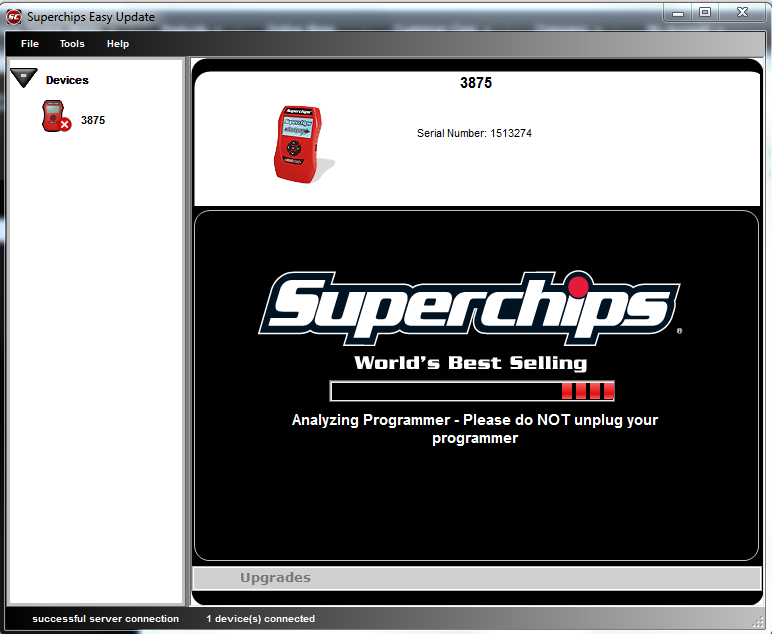
Any Ideas whats going on? If you have any input on this please PM Me
Thanks
I bought my SC awhile ago and have it on the 93 octane performance setting. I haven't updated it since I bought it months ago so tonight I plugged it into my computer ans signed into the Update Software and it starts to connect but then just stays on the initial screen where it says "ANALYZING YOUR PROGRAMMER- Please Do Not Unplug Your Programmer" Then an X appears next to the icon under the Devices menu. The display of the SC says "USB Port Time Out"
Any Ideas whats going on? If you have any input on this please PM Me
Thanks

JK Jedi Master
Joined: Aug 2007
Posts: 15,665
Likes: 4
From: Hammond Louisiana
I dunno, but it seemed like it took forever for mine to update, I thought something was wrong. Is the bar thing still moving every once in awhile? I'd hold off unplugging, think mine was about 10 or 15 min.
JK Super Freak
Joined: Apr 2009
Posts: 1,139
Likes: 0
From: Tulsa, OK
i agree. mine was slow too. maybe connection? or possibly its just a slow program
JK Newbie
Joined: Jun 2010
Posts: 51
Likes: 0
From: Newark, DE
I left the house for an hour and it was still on the same screen. I sent a email to SC explaining the situation. Hopefully they'll get back to me with an answer. And for the record. there "Quick" update software isn't very quick. It takes me about 3 attempts just to log into the system. It's not user error ether. 