


Superchips Flashpaq for JK, Initial Impressions



JK Enthusiast
Joined: Jun 2010
Posts: 321
Likes: 0
From: Jasper, IN

Also, you could try a different USB port. I think I remember reading somewhere (maybe the manual) that using a USB port on a keyboard or monitor may not provide enough power to run the Flashpaq properly.

JK Newbie
Joined: Aug 2009
Posts: 71
Likes: 0
From: Apple Valley, CA
I'm a computer tech and even I had quite a few problems getting it to update. The only thing I got to work was to directly hookup my computer to my cable modem. I normally have a server and separate firewall, no matter what I disabled firewall wise it would not work. Forwarded all kinds of ports, setup my computer as a dmz host. Still no go. As soon as I directly connected it to my modem all went well. I tried at my office also and had the same problem.
Worth a try...
Instructions if you have a modem and a router:
Unplug both your cable or dsl modem from power.
Turn off your computer.
Unplug the Ethernet cable from the router that runs from your modem and hook it up to your computer directly, replacing the spot where the Ethernet cable is currently plugged in from your router.
Power back on your modem and let it boot all the way up, about 60 seconds.
Then turn back on your computer.
If all goes well your computer should pull an ip address from your provider.
Open your Internet browser and make sure you have Internet.
If you do, try the superchips software and see if it works.
If you don't have internet when you test with your browser, your provider may have special settings that you'd have to contact them about.
To set it back how it was just power everything back down and replace all the cables to the original locations, power on the modem, wait 60seconds, then power back on the router, wait 60 seconds, then power back on the computer.
Worth a try...
Instructions if you have a modem and a router:
Unplug both your cable or dsl modem from power.
Turn off your computer.
Unplug the Ethernet cable from the router that runs from your modem and hook it up to your computer directly, replacing the spot where the Ethernet cable is currently plugged in from your router.
Power back on your modem and let it boot all the way up, about 60 seconds.
Then turn back on your computer.
If all goes well your computer should pull an ip address from your provider.
Open your Internet browser and make sure you have Internet.
If you do, try the superchips software and see if it works.
If you don't have internet when you test with your browser, your provider may have special settings that you'd have to contact them about.
To set it back how it was just power everything back down and replace all the cables to the original locations, power on the modem, wait 60seconds, then power back on the router, wait 60 seconds, then power back on the computer.


JK Freak
Joined: Sep 2007
Posts: 740
Likes: 0
From: Lanark IL
Can someone help me out on this? I'm going to contact SC directly but in the mean time was wondering if anyone else has had this issue.
I bought my SC awhile ago and have it on the 93 octane performance setting. I haven't updated it since I bought it months ago so tonight I plugged it into my computer ans signed into the Update Software and it starts to connect but then just stays on the initial screen where it says "ANALYZING YOUR PROGRAMMER- Please Do Not Unplug Your Programmer" Then an X appears next to the icon under the Devices menu. The display of the SC says "USB Port Time Out"
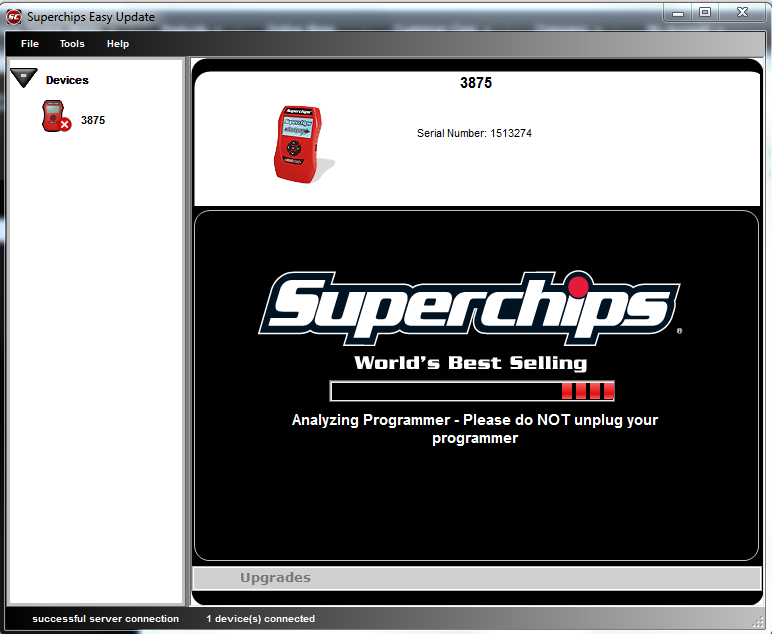
Any Ideas whats going on? If you have any input on this please PM Me
Thanks
I bought my SC awhile ago and have it on the 93 octane performance setting. I haven't updated it since I bought it months ago so tonight I plugged it into my computer ans signed into the Update Software and it starts to connect but then just stays on the initial screen where it says "ANALYZING YOUR PROGRAMMER- Please Do Not Unplug Your Programmer" Then an X appears next to the icon under the Devices menu. The display of the SC says "USB Port Time Out"
Any Ideas whats going on? If you have any input on this please PM Me
Thanks
I experienced this same exact thing tonight. It took me 6 tries before I got it to update.

Thread Starter
JK Junkie
Joined: Jul 2008
Posts: 3,017
Likes: 0
From: Lakewood, OH

JK Newbie
Joined: Jun 2010
Posts: 51
Likes: 0
From: Newark, DE
PC TECH as well. I think there update software doesn't like Windows7 64 bit. I hooked it up to my wifes laptop running XP 32 bit and it worked fine. Thanks for everyones help on this.

JK Enthusiast
Joined: Mar 2010
Posts: 145
Likes: 0
From: Ontario
I have the opportunity to buy a superchips locally through kijiji but had a question. The seller has it advertised as a flashpaq for Chrysler gasoline engines. Would this be what I'm looking for for the jk or is there a specific jeep wrangler flashpaq?
Thanks!
Thanks!